¿En qué se te fue el sueldo?
Anota un gasto con un audio.
Lo anotas en el chat que ya abres todo el día. Sin descargar nada y sin conectar tu banco.
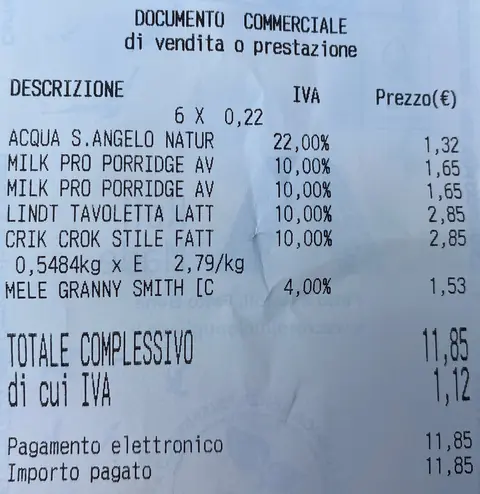
Escribe, manda un audio o la foto del ticket. Monetell lo anota, lo ordena y te dice cuánto te queda este mes.
25 registros gratis · Sin tarjeta · Sin descargar nada
Te quedan 387,60 € este mes.
Te quedan 375,75 € este mes.
Escribe un gasto y mira qué te contesta.
Empiezas y a la semana lo dejas.
No es falta de disciplina. Anotar cada gasto en una app o en una hoja da pereza, y lo que da pereza se abandona.
- La app que pedía tu banco.La borraste antes de usarla.
- La hoja de cálculo.La abriste dos veces.
- El día 20.Ya vas con lo justo y no sabes en qué se fue.
 churros y café 4,20
Desayuno en un bar, Madrid  mercado 230
Mercado de Jamaica, CDMX  vermut y tapas 18,50
Mercado de San Miguel, Madrid  paletas 70
Mercado de Coyoacán, CDMX
Un mensaje y listo.
Ni categorías que elegir ni formularios. Le hablas como a un amigo y Monetell hace el resto.
Cuando pagas
- Escribes «súper 23,80»3 s
- O mandas un audio3 s
- O la foto del ticket5 s
Al momento
- Monetell lo anota y le pone categoríaal instante
- Te dice cuánto te queda del mesal instante
Cada domingo
- Tu resumen de la semana, sin pedirlo19:00
Apps descargadas0
Lo que recibes.
En cada gasto
La categoría, puestaincluido
Súper, comer fuera, transporte, casa… Si no acierta, escribe «deshacer» y mándalo otra vez.
Lo que te queda del mesincluido
Pones tu presupuesto una vez («presupuesto 400») y cada respuesta te dice cuánto te queda.
Deshacer«deshacer»
¿Te equivocaste? Se borra el último gasto.
Sin pedirlo
Resumen semanaldomingo
En qué se te fue la semana, por categoría.
Informe del mes en imagendía 1
Una imagen con el mes entero. Para guardarla o mandársela a tu pareja.
Tus datos
Exportar a CSV«exportar»
Todos tus gastos en un archivo que abre cualquier hoja de cálculo.
Borrarlo todo«borrar mis datos»
Y desaparecen.
Gastaste 142,60 € en 19 gastos los últimos 7 días.
Donde más se fue:
· Súper: 61,20 €
· Comer fuera: 55,40 €
· Transporte: 18,50 €
· Otros: 7,50 €
Tu semana, sin pedirla.
Cada domingo a las 19:00, cuánto gastaste en la semana y dónde se fue más.
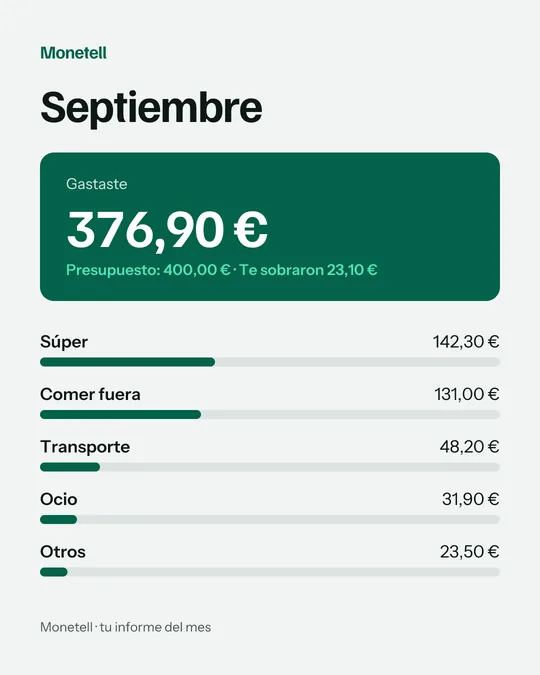
El mes, en una imagen.
El día 1 llega el informe del mes anterior: por categoría, contra tu presupuesto.
| fecha | importe | categoría | nota |
|---|---|---|---|
| 12/10 | 23,80 | Súper | súper |
| 12/10 | 2,50 | Comer fuera | café |
| 11/10 | 8,50 | Transporte | uber |
Tus gastos, en un archivo.
Escribe «exportar» y te llega un CSV con todo. Lo abres en cualquier hoja de cálculo.
Tu banco, fuera.
No conectamos tu banco ni te pedimos contraseñas. Tus datos son tuyos: los exportas o los borras con un mensaje.
Los pagos los procesa Paddle. Monetell nunca ve tu tarjeta.
Si tienes una suscripción, la cancelo en el mismo momento.
Para confirmar, responde BORRAR en los próximos 10 minutos.
Empieza gratis. Paga si sigues.
Anual
Ahorras 31,89 €
- 25 registros o 7 días gratis
- Sin tarjeta para empezar
- Garantía de 30 días
- Cancelas cuando quieras
Mensual
5,99 € al mes
Al terminar la prueba te mandamos por WhatsApp un enlace de pago seguro. Precios con impuestos incluidos.
Preguntas.
¿Necesito descargar algo? No. Todo pasa en WhatsApp, en el número de Monetell.
¿Tengo que conectar mi banco? No. Tú decides qué anotar, y nunca te pedimos contraseñas.
¿Entiende mis audios y mis tickets? Sí. Dile «doce con cuarenta en el súper» o manda la foto del ticket y lo anota. Si duda, te pregunta.
¿Es asesoría financiera? No. Monetell es una herramienta para anotar y entender tus gastos. Las decisiones son tuyas.
¿Cómo pago? Al terminar la prueba te mandamos un enlace seguro por WhatsApp. Los pagos los procesa Paddle, con tarjeta, PayPal o Apple Pay.
¿Puedo cancelar? Cuando quieras, en dos toques. Y tienes 30 días de garantía: si no te convence, te devolvemos el dinero.
¿Qué pasa con mis datos si no sigo? Los guardamos 30 días por si vuelves. Después se borran solos. Si los quieres borrar antes, escribe «borrar mis datos».
¿En qué moneda funciona? En euros si estás en España y en pesos si estás en México. Lo detecta por tu número.
Tu primer gasto, ahora.
Se abre WhatsApp con el mensaje escrito. Lo mandas y empiezas.
25 registros gratis · Sin tarjeta · Sin descargar nada